
Features
Built for analysts who live in complex models.
Tracey is a visual audit layer for Excel. It lets you understand any formula at a glance and move through your workbook with confidence, without touching the underlying data.
Trace any formula, both ways
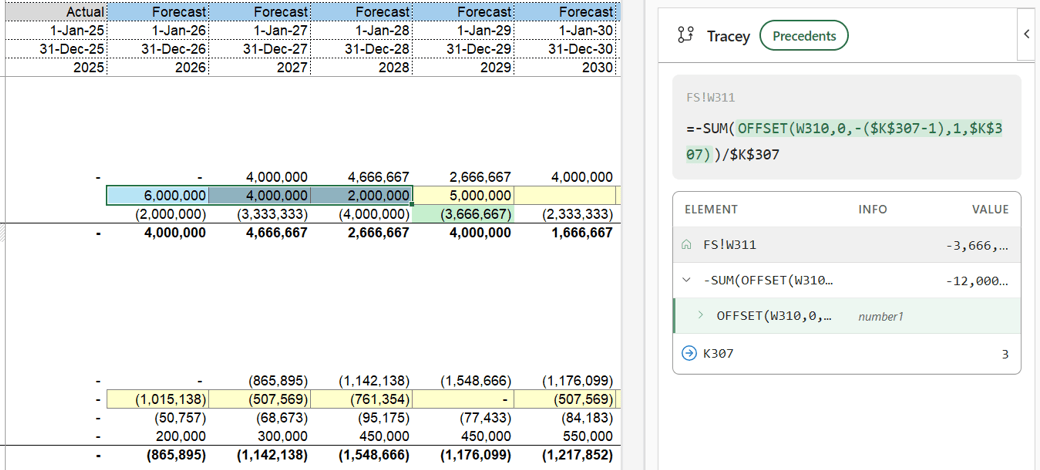
Select any cell and Tracey unpacks its formula into a clean, collapsible tree - every function, argument and reference laid out like an outline you can actually read. Click a node and the exact cells behind it light up in your worksheet, with lookups and offsets resolved live to the range they hit right now. Every reference is a link, so you can follow the logic across sheets and back, in either direction: from the inputs that build a number to everything that number feeds into.
- Full formula tree - unlimited nesting, collapsible branches, arguments labelled inline
- Live smart highlighting for OFFSET, INDEX, VLOOKUP, XLOOKUP, INDIRECT and the whole criteria family (SUMIF, COUNTIF and friends), including the matching cells
- Cross-sheet jumps to any cell, range or named range - tabs switch automatically, breadcrumbs bring you back
- Precedents and dependents from the same selection, with intermediate values shown inline
Never touch the mouse
Auditing a model shouldn't mean hunting through ribbons and dialog boxes. Tracey runs on four keystrokes, so you stay in the flow of the model - open a trace, flip direction, jump to a cell, and snap back to where you started, all without leaving the keyboard.
- Keep both hands on the keyboard - trace, flip direction, jump to a cell and return without reaching for the mouse
- Stay in the flow of the model instead of breaking concentration for ribbons and dialog boxes
- Built for fast, repeated audits across large or complex workbooks
 TraceyShortcuts
Works everywhere Excel does
Tracey installs from the Microsoft Marketplace in a couple of clicks and runs natively inside Excel - on Windows, on Mac, and in the browser. Open a workbook, press Ctrl + Q, and start tracing. Nothing else to install, and your data never leaves the sheet.
- Excel 365 on Windows, Mac and the web
- One-click install from the Microsoft Marketplace
- Runs entirely inside Excel - no separate app, no data leaving your workbook
Try every feature free for 7 days.
No credit card required.